When it comes to launching an online store, two of the most popular platforms are Shopify and WooCommerce.
Both CMS platforms offer a wide range of features, but each has its own way of working, its own characteristics, and its own strengths, which makes it difficult for entrepreneurs to decide which option is best for them.
Both have large communities of fans and extensive portfolios of websites that you can browse to help you make your decision. In this article, we’ll explore the differences between Shopify and WooCommerce and provide an in-depth comparison of these two e-commerce CMS platforms to help you choose the one that best meets your goals and your business’s needs.
What are the main differences between these two systems?
We need to provide an overview of these two CMSs here. But first, a brief explanation of the term “CMS.”
CMS: What Is It?
A CMS (Content Management System) is a system for managing content—that is, a software application that helps users create and manage digital content. The main advantage of using a CMS is that it makes it easier for users to create and maintain websites without needing to be an IT specialist or developer. There are several different types of CMS, each tailored to different needs:
- Open-source CMSs are free to use and provide access to the source code so that developers can customize features to suit their needs. You are responsible for hosting it.
- Self-hosted systems provide hosting, but give you less control over the design and features of the websites.
Introduction to Shopify
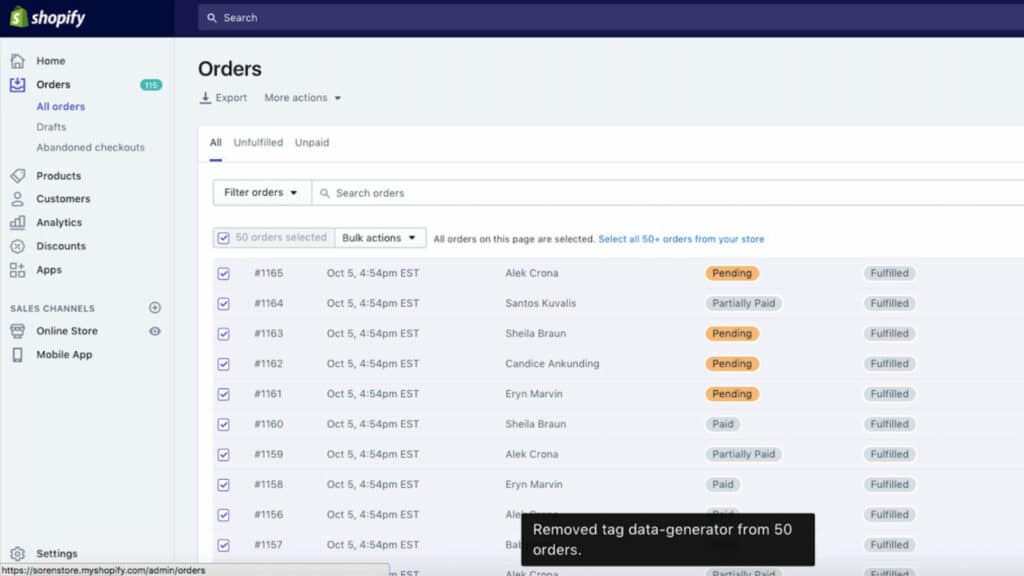
Shopify is an all-in-one e-commerce platform that has been helping businesses succeed since 2006. With a mission to improve commerce for everyone, Shopify provides the tools and resources needed to create an online store and manage sales. From marketing to payments, Shopify enables entrepreneurs of all levels to easily start, manage, and grow their businesses.
Shopify offers a wide range of features, including customizable themes, secure payment processing, integrated shipping solutions, and 24/7 customer support. Merchants can also take advantage of marketing tools such as social media integration, as well as analytics to track performance in real time. This CMS also offers other features such as website builders, inventory management capabilities, and integrations with third-party services like Google Ads and Amazon Seller Central.
With these powerful tools at your disposal, you can launch your online business with confidence. Shopify is growing at a rapid pace, which means it’s expanding quickly and new features are being added every day.
WooCommerce
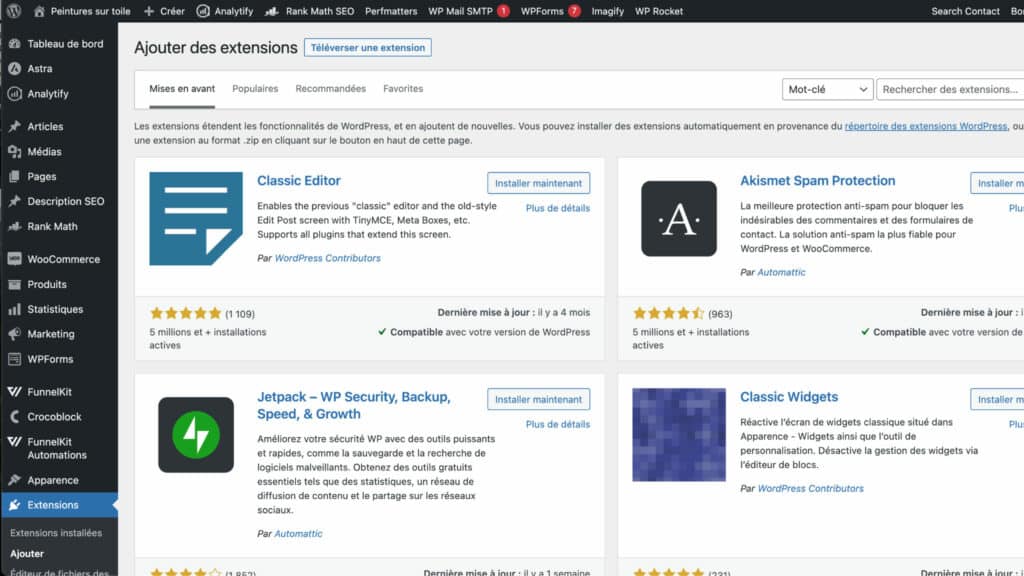
WooCommerce is a revolutionary e-commerce platform that can help you create an online store for your business. It is actually a plugin for WordPress, the world’s most widely used content management system. Since this software is open source, it offers a great deal of flexibility in designing your online store.
It's an incredibly powerful tool for those looking to increase their
digital presence, allowing them to create an online store without having to write a single line of code. Whether you're selling physical goods or digital downloads, WooCommerce makes it easy to get started.
The platform comes with a variety of features and tools that allow users to customize their site to suit their needs. Whether it’s adding products, setting up payment options, or more, WooCommerce gives you complete control over the look and feel of your online store. In addition, all transactions are processed securely through PayPal, Stripe, or other payment gateways so that customers can shop with confidence.
WooCommerce also offers comprehensive analytics so users can monitor sales performance in real time. Shopify vs. WooCommerce
In the world of e-commerce, businesses often choose between Shopify and WooCommerce to power their online stores. To help you determine which is the right choice for your business, we’ve examined several factors for you. In this section, we’ll compare Shopify and WooCommerce in terms of ease of use, features, pricing, SEO, user experience, and scalability. Both platforms offer a myriad of benefits, which we’ll explore together.

Criterion #1: Ease of Use
To start, we'll take a look at how user-friendly these two platforms are.
On the Shopify side
If you're new to e-commerce and want to get your website up and running quickly, Shopify is definitely the way to go.
With Shopify, you can sign up in just a few minutes and gain access to a variety of high-quality themes that you can install with just a few clicks. Each theme is designed to help you get your business up and running quickly, so you can start selling right away.
The design tools are simple yet powerful, allowing you to easily customize the look of your store, add products, manage inventory, accept payments, and more.
On Shopify, all features come pre-installed: whether it’s analytics, payment solutions, or the billing system. Everything is practically ready for you to get started quickly and start processing your first orders. You’ll save a considerable amount of time compared to WooCommerce.
One of the major advantages of using a proprietary system is that you have access to responsive customer support that can help you when you need it. You can contact them by email or even call them. In terms of convenience, it’s hard to beat.
On the WooCommerce side
WooCommerce requires a little more work. This CMS isn't any more complicated than Shopify; it's just that there are a few steps you need to take beforehand.
You’ll need to start by setting up your WordPress site on a web hosting service. Once it’s up and running, you’ll need to install the WooCommerce plugin, and then choose a theme. When it comes to choosing a theme, that’s where things get a little more complicated. You’ll need to search for a theme on various platforms, such as WooCommerce or ThemeForest.
So it may take much longer, but the range of options available to you is also much wider.
Unlike Shopify, with WooCommerce, you'll need to extend the core system to add the WooCommerce features you need yourself.
When it comes to support, WooCommerce does have a very active community, but it won’t be as responsive as dedicated customer support. If you’d like this kind of service on WooCommerce and want guidance, we recommend working with an agency to get responsive technical support that can help you out when needed.
So, what's the verdict? When it comes to ease of use, Shopify is the clear winner, with a platform that lets you get a website up and running in no time at all.
Criterion #2: Features
Now is the time for us to compare the features of the two platforms.
Many extensions
The Shopify platform offers thousands of different apps. You can find excellent, feature-rich apps for all types of businesses, but many of these apps require a fee. Some can even be quite expensive.
On WooCommerce, extensions are smaller and less comprehensive, but there are also many more of them, and they are tailored to the various needs of an online store.
What may be seen as an advantage is also a disadvantage, since many extensions are of poor quality. It is therefore essential to know how to find the best plugins.
The great strength of this system lies in the fact that you can do just about anything with it, and since it’s an open-source CMS, these extensions can be easily modified. This means they adapt perfectly to your needs, unlike Shopify, where it’s difficult to customize extensions.
WooCommerce has the major advantage of being part of the WordPress ecosystem, which also offers a wide range of high-quality plugins. These plugins allow you to do certain things that would be impossible on Shopify, such as creating an e-commerce site for online training, with the training platform integrated directly into the e-commerce site. To learn more…
WooCommerce is a bit like a block of modeling clay. You can turn it into a real powerhouse, but that requires having the necessary knowledge—or getting the right guidance.
In terms of support, Shopify can help you set up your site or troubleshoot bugs. With WooCommerce, it’s different: some plugins offer good support, but not all of them do. As for plugin updates on WooCommerce, they can sometimes cause bugs.
In conclusion, it’s worth noting that Shopify has excellent extensions that are easy to install but may be limited in terms of functionality.
WooCommerce, while a bit more complicated, generally allows you to do a lot more. So for this round, we'll call it a tie.
Criterion No. 3: Price
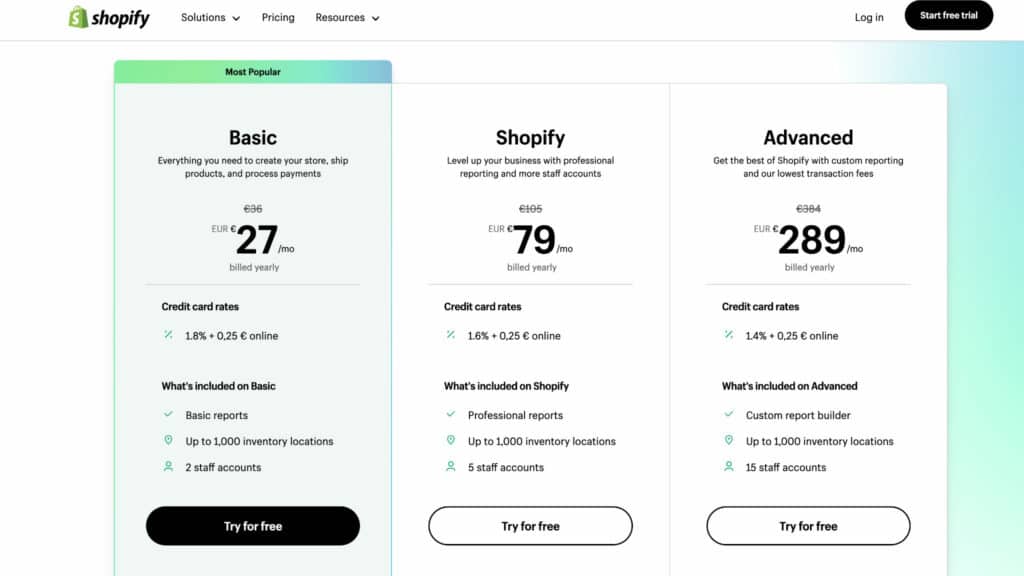
Shopify offers plans starting at €27 per month, while WooCommerce is a plugin that offers a free plan. So it seems logical that WooCommerce would have the edge when it comes to price, but that’s not the case.
Things are a little more complicated than they seem
Just because WooCommerce is open source and free doesn’t mean it’s necessarily less expensive. In fact, with WooCommerce, you’ll need to purchase plugins, a theme, and hosting, which means you’ll have to spend quite a bit up front to launch your online store. Keep in mind that most WooCommerce plugins are either one-time purchases or require an annual subscription, which can quickly drive up the cost when you’re launching your store.
Shopify offers a free trial, and its subscription plans aren’t overly expensive compared to premium WooCommerce hosting. However, as we mentioned earlier, extensions are generally more expensive and billed monthly. Not to mention that Shopify, in addition to your subscription fee, will charge you a commission on all your sales.
A few figures to illustrate our point
Based on our experience and having run stores on both platforms, we can tell you that WooCommerce will be more expensive at first, but in the long run, it’s much cheaper—especially as your revenue grows. That’s because no commission is charged on your sales.
So, if your store grows successfully in the future and you need custom development, WooCommerce—with its open-source technology and PHP—will always be less expensive for custom development compared to Shopify, which will incur much higher development costs.
On this criterion as well, we can say it’s a tie: Shopify is less expensive in the short term, but WooCommerce is the clear winner in the long term.
Criterion #4: SEO (Search Engine Optimization)
Having a beautiful online store with lots of features is great—as long as you have visitors. To attract those visitors, SEO plays a crucial role.
Shopify offers SEO tools to improve your organic search rankings; they’re relatively easy to use. You can configure SEO settings such as meta titles and meta descriptions right within the platform.
WooCommerce, on the other hand, does not offer any built-in options for managing your SEO. However, since it benefits from the WordPress ecosystem, it has access to the best SEO tools on the market, such as RankMath.
WordPress is the CMS that Google understands best, and it’s clearly the most suitable platform for SEO today.
WooCommerce's flexibility allows you to make advanced optimizations, which are very difficult to achieve on Shopify. This gives you the ability to change permalinks or modify internal settings to improve your search engine rankings.
If you're proficient with WooCommerce and have some experience with SEO, you'll definitely have fun and be able to take your e-commerce site's optimization to the next level.
Shopify does offer solid basic features, and there are large stores that drive significant traffic through organic search. So it’s definitely possible to achieve great results on Shopify; however, if you’re not afraid to get your hands dirty, then WooCommerce is clearly the platform that allows for the best SEO optimization.
Thanks to its high-performance SEO extensions, WooCommerce is undoubtedly the winner in this round. Despite all of Shopify’s efforts in the area of SEO, the WordPress/WooCommerce duo remains virtually unbeatable.

Criterion No. 5: User Experience
WooCommerce and Shopify are two of the e-commerce platforms used by small businesses, individuals, and large companies to create attractive online stores. User experience (UX) is an important factor when choosing a platform. It’s very important to have an attractive design that appeals to users, just as it’s equally important to have a fast-loading website.
Today, each of these platforms offers modern, high-performance themes. Shopify offers less flexibility in website design, so its themes generally adhere to best practices and, on average, perform better than WooCommerce themes. Note that there are some very well-designed themes available on WooCommerce, so if you make the right choice, there isn’t much difference compared to Shopify.
If you have the budget, we recommend working with an agency that can create custom graphic templates and integration for you. The visual appeal and user experience of your website depend primarily on your budget and the agency’s expertise, regardless of the CMS you use.
With Shopify, you don’t have to monitor your site’s performance at the server level, which is a huge advantage and helps create a better user experience. That’s why some e-commerce stores that have migrated from PrestaShop to Shopify have seen improved conversion rates.
Many users find the Shopify admin panel easier to use than WooCommerce's.
Note, however, that WooCommerce supports WordPress page builders such as Elementor, which are highly advanced and easy-to-use page editing tools.
In terms of UX, Shopify has the edge when it comes to themes, but when it comes to customization, let's just say it's a tie.
Criterion No. 6: Scaling
If your store is growing, that's great news, but you need to be able to keep up with the scaling of your sales. If you're looking for simplicity, then Shopify is the solution, but it will cost you a lot, because commission fees will also go up.
With WooCommerce, you're in control of the costs. So it costs you less, but the downside is that you're responsible for managing your server, which can be a big mental burden.
In addition to vertical scaling—that is, within your existing site—there’s also horizontal scaling, where you duplicate your site. It will then serve as the basis for a new site; since WooCommerce is open source, this is clearly the most suitable solution.
That is why our agency chose WooCommerce. It allows us to easily reuse our code to create new stores in a chain and improve them over time. This flexibility gives us a competitive edge.
If your site were to become really large, you'd need to switch to a technology called "headless e-commerce," but we won't go into that today.
Shopify or WooCommerce: A Video Guide
So, in the end, which platform is better: Shopify or WooCommerce?
To this simple question, we would say that there is no single, definitive answer. It really depends on your needs and the type of business you run.
If you're looking for something simple and effective, then Shopify is definitely the right choice for you. The same goes if you have a seasonal business with irregular sales that requires a certain level of system stability.
If your priority is flexibility and lower costs, then WooCommerce is an excellent solution.
If you’re certain you have a strong SEO foundation and want the flexibility to implement custom features, then WooCommerce is the best option.
In any case, each of these platforms can deliver excellent results. What really makes the difference is your own skills or those of your service providers.
At Ingenius, we are fully aware of this, which is why we do everything we can to be the number one agency for WooCommerce.